

Description
Download Undrtone – Music Discovery, Spotify, SoundCloud, Rdio, Beats
Overview
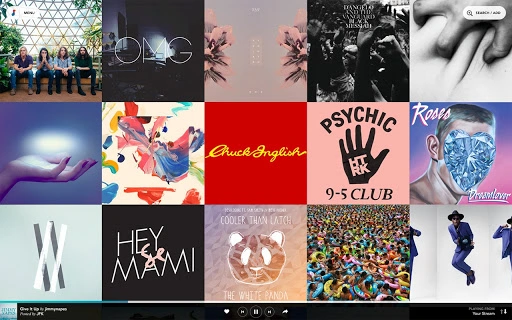
Undrtone is a desktop application designed to enhance the way users discover, share, and enjoy music across major cloud-based platforms. Built for music lovers and fans who want a unified experience, the software integrates with Spotify, SoundCloud, Rdio, and Beats, creating a dynamic, community-driven music environment. The primary purpose of Undrtone is to streamline music exploration by curating personalized streams based on user preferences and social interactions. It enables users to follow artists, tastemakers, and friends, while also viewing trending tracks in real time across the globe.
Target users include casual listeners, music enthusiasts, and individuals who frequently switch between multiple music services. The software is particularly useful for those who value social discovery—finding new music through shared playlists, likes, and recommendations from peers. Real-world usage scenarios include using Undrtone during commutes, work sessions, or social gatherings to access a continuous, personalized music stream. The developer, Undrtone, appears to focus on building a seamless, cross-platform experience that unifies music access and community engagement.
Key Features & Capabilities
- Multi-Platform Integration: Connects to Spotify, SoundCloud, Rdio, and Beats, allowing users to access content from all platforms within a single interface.
- Personalized Music Streams: Generates a never-ending, algorithmically curated stream of music based on user preferences and social activity.
- Global Trend Tracking: Displays real-time trending tracks from around the world, helping users stay updated on popular music across regions.
- Social Discovery & Sharing: Enables users to follow friends, music influencers, and artists, and share tracks directly through the app.
- Automatic Playlist Creation: Likes and interactions are used to generate and update playlists automatically, reducing manual curation.
These features work together to create a cohesive music discovery experience. For example, a user can like a track from a friend’s stream, which then gets added to their personal playlist and may influence future recommendations. The app also supports offline listening, allowing users to enjoy their favorite music anytime, anywhere. By combining social interaction with content aggregation, Undrtone aims to make music discovery more engaging and community-oriented.
User Interface, Workflow & Performance
The user interface of Undrtone is designed for intuitive navigation, with a clean layout that emphasizes music content and social activity. Key sections include a central playback area, a sidebar for navigation, and a real-time feed showing recently liked tracks and trending songs. Users can switch between platforms, view their followed artists, and manage playlists with minimal clicks.
Workflow efficiency is enhanced by the app’s integration with cloud services, enabling instant access to music libraries and social feeds. The app’s responsiveness appears to be consistent across supported platforms, though exact performance details were not specified. The developer did not provide additional system requirements, so users should expect general desktop application behavior in terms of CPU and RAM usage. Stability is assumed to be standard for a modern desktop app, but no specific reliability metrics were shared.
Compatibility & System Requirements
Undrtone is available for Windows, Mac, and Linux, making it accessible to a broad range of users. The software version is 1.0, with a file size of 50 MB, indicating a lightweight installation. The developer did not specify exact system requirements, so users should ensure their system meets general desktop application standards. Compatibility information was partially provided, and no platform-specific limitations were noted.
Installation is straightforward, and the app runs as a standalone desktop application. Users can launch it from their system tray or desktop shortcut. No additional dependencies were mentioned, suggesting a self-contained setup. The software is designed to function on modern operating systems, though specific version numbers were not listed.
Pros and Cons
Pros
- Seamless integration with major music platforms: Spotify, SoundCloud, Rdio, and Beats
- Free to use with no subscription required
- Real-time global music trend tracking
- Automatic playlist generation based on likes and interactions
- Cross-platform support for Windows, Mac, and Linux
Cons
- Exact system requirements were not listed
- Performance and resource usage details not disclosed
- Limited information on update frequency and support
- No official mobile app mentioned
- Community features depend on active user base for full functionality
FAQ Section
Is Undrtone available for all major operating systems?
Yes, Undrtone is compatible with Windows, Mac, and Linux, providing a cross-platform experience for desktop users.
Is the software free to download and use?
Yes, Undrtone is completely free to download and use without requiring a paid subscription.
Does Undrtone require an internet connection?
Yes, since the app relies on cloud-based music services, an active internet connection is necessary for streaming and social features.
Can I use Undrtone without accounts on Spotify, SoundCloud, Rdio, or Beats?
While the app supports integration with these platforms, users must have active accounts on the services they wish to access through Undrtone.
How often are updates released?
Update frequency was not specified by the developer. Users should check the official website for the latest version.
Final Thoughts + CTA
Undrtone delivers a compelling vision for music discovery by unifying multiple platforms into a single, social experience. Its ability to aggregate music from Spotify, SoundCloud, Rdio, and Beats into a personalized, real-time stream sets it apart from standard music players. The app’s focus on community engagement—through following friends, sharing tracks, and tracking global trends—makes it ideal for music lovers who value discovery and connection.
While some technical details like system requirements and performance metrics are not available, the app’s lightweight size and cross-platform availability suggest broad accessibility. For users seeking a free, desktop-based music discovery tool that blends social interaction with streaming, Undrtone offers a strong option.
Download Undrtone now and start discovering music with your community.
Guides & Tutorials for Undrtone App for Chrome
How to install Undrtone App for Chrome
- Click the Preview / Download button above.
- Once redirected, accept the terms and click Install.
- Wait for the Undrtone App for Chrome download to finish on your device.
How to use Undrtone App for Chrome
This software is primarily used for its core features described above. Open the app after installation to explore its capabilities.
User Reviews for Undrtone App for Chrome 0
No reviews found





